
#20261113001_EN
By Cahit Temizkan, Founder & Managing Director, OXORY
Summary
AI agents are becoming part of the SAP standard, and at the same time many SAP landscapes contain systems that offer no clean interface. This paper describes the access paths that exist today, when each one fits and which guardrails apply to all of them. The central rule is simple: use APIs and MCP first, use screen reading only where no API exists, and let the language model only reason, never touch SAP directly.
Why AI agents are arriving in SAP now
Three developments explain the timing.
The goal is AI agents that understand and execute processes in SAP in a controlled and traceable way, and through the right access path.
- **Agents are part of the standard.** The Skill Builder in Joule Studio has been generally available since July 2025, the Agent Builder since December 2025.
- **Open standards instead of one-off integrations.** The Model Context Protocol (MCP) and the Agent2Agent protocol (A2A) connect agents, models and systems in a uniform way. SAP Build and Joule Studio support both.
- **Clean Core demands clean interfaces.** Classic routes such as scripts over RFC or the GUI increasingly reach their limits in cloud environments like RISE with SAP. This last point is our market assessment, not an SAP commitment.
Three AI layers on SAP BTP
SAP's standard offering can be read as three layers:
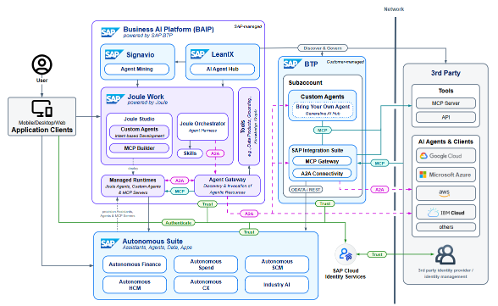
- **Joule talks.** Joule is the single entry point for users. It understands the request, routes it to the right agent or skill and works inside SAP applications.
- **Joule Studio builds.** Skill Builder and Agent Builder in SAP Build let teams develop company-specific skills and agents, low-code or pro-code.
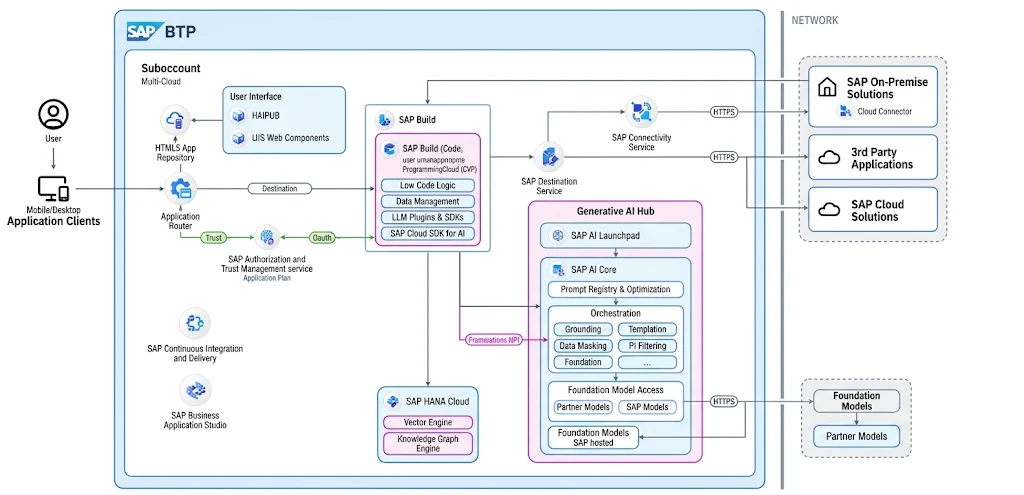
- **AI Foundation provides models and data.** Models are accessed through SAP AI Core and the Generative AI Hub. Grounding in enterprise data uses the HANA Cloud Vector Engine and the Knowledge Graph.
Skill or agent in Joule Studio
A **skill** is rule-based. It runs a single, repetitive operation with a fixed input and output format and needs no reasoning, for example retrieving the stock level of a material.
An **agent** is goal-oriented. It plans, reasons and picks the right tools on its own, which suits scenarios with exceptions and fragmented processes, for example re-assessing a delivery route after a disruption and suggesting options.
Agents use data, documents and the SAP Knowledge Graph as well as tools and MCP servers. Several specialized agents can be orchestrated into one end-to-end flow, and skills and agents are managed centrally with visibility into execution.
Integrating AI agents with Joule
The reference architecture has three properties. Users work through **one entry point**, Joule, which routes requests to agents and skills. Custom agents from Joule Studio run on **one platform** next to the prebuilt SAP agents. And the architecture is **open to third parties**: third-party agents and MCP servers connect through open standards.
Generative AI on SAP BTP
The Generative AI Hub in SAP AI Core is one access point to many models. It bundles models from providers such as OpenAI, Anthropic, Google, Mistral, NVIDIA, Amazon and SAP; the list changes continuously. A harmonized orchestration API provides templating, content filtering and translation, so you can switch models without changing client code. For grounding in your own data, the HANA Cloud Vector Engine and the Knowledge Graph support retrieval-augmented generation.
Custom solutions: one agent, two ways into SAP
Not every scenario fits the standard offering. A custom or off-the-shelf agent can use a language model (online, for example Claude, OpenAI or Gemini, or a local model on-premise) and reach SAP in two ways.
**Path 1: the system has an API.** An MCP server exposes SAP functions as tools with schemas, with one call format for OData, RFC and REST. This works for S/4HANA, ECC and non-SAP systems, with or without BTP.
**Path 2: no API, screen only.** A screen-reading agent reads the screen, clicks and types, and verifies the result. It runs in an isolated session and executes critical steps only with approval. It is meant for SAP GUI, legacy applications and portals, and it is sensitive to UI changes.
Path 1: connecting via MCP
MCP is an open standard that describes how an agent discovers and calls the tools of a system. It was published by Anthropic in November 2024.
Two cautions. MCP only governs access; business context and quality come from tool descriptions, authorizations and grounding. And according to the SAP Architecture Center, operational responsibility for third-party MCP servers (security, availability, upgrade compatibility, compliance) rests with the customer or partner that runs them. SAP also offers an MCP Gateway on SAP Integration Suite as a governed alternative; the protocol is still maturing, so plan for change.
- **Without BTP:** the MCP server runs locally or in the corporate network and talks to the SAP system over HTTPS or RFC. There is no cloud requirement and no Joule licence.
- **With BTP:** the MCP server runs on Cloud Foundry. Access goes through the Destination service and the Cloud Connector, and Joule Studio finds the server through the destination.
Path 2: agents that read the screen
The loop has four steps: **see** (capture the screen), **understand** (recognize fields and state), **act** (click and type) and **verify** (check the result and repeat if needed). Because UI changes can break the flow, deployment needs three guardrails: an isolated session with a dedicated, restricted user, human approval for critical steps, and a maintenance plan.
Which path fits when
Rule of thumb: check Joule Studio or MCP first and use screen reading only as a last resort. The comparison is a decision aid, not a complete product assessment.
- **Joule Studio** fits processes with standard APIs where business teams build too. It needs SAP Build and BTP. Its strength is being SAP-native and centrally managed; its limit is the tie to the SAP platform.
- **MCP server** fits your own AI application accessing SAP. It needs an API (OData, BAPI, RFC or REST). It is standardized and reusable, but provides no business context by itself.
- **Screen reading** fits SAP GUI, legacy applications and portals. It needs screen access but no API, and works where nothing else does. Its limit is sensitivity to UI changes.
Guardrails for AI agents in SAP
- **Least privilege:** a dedicated technical user per agent, with only the permissions it needs.
- **Approval:** a human confirms critical steps before they run.
- **Traceable:** tracing and audit across the whole chain from agent to SAP system.
- **Model choice:** online or local model, depending on data protection and compliance requirements.
Our approach with OXORY
We propose four phases; the timeline per phase depends on the process and the system landscape.
Request a potential workshop to run this against your own landscape. Related OXORY solutions: AI IDOCMON and AI DEVGUI.
- **Potential workshop:** capture use cases, systems and existing interfaces.
- **Architecture and model choice:** Joule, MCP or screen reading; online or local model.
- **Pilot:** one concrete process with approvals and monitoring.
- **Operations and rollout:** more agents, governance and user training.
Sources and status
Based on SAP Joule Studio product information, SAP Architecture Center reference architectures (including Third-Party MCP Access to SAP Solutions) and SAP Learning. Product availability and model lists change; status as of November 2026. Check the current SAP roadmap before planning.
Frequently asked questions
- Should we start with Joule Studio, MCP or screen reading?
- Check Joule Studio or MCP first. Use screen reading only where no API exists, for example SAP GUI, legacy applications or portals.
- Does the language model access SAP directly?
- No. The model only reasons. Access to SAP goes through an MCP server or a controlled screen-reading session with approvals.
- Do we need BTP to use MCP with SAP?
- No. An MCP server can run locally or in the corporate network and connect over HTTPS or RFC. With BTP it runs on Cloud Foundry and is reached through the Destination service and Cloud Connector.
Next step
Let's work out what this means for your own SAP landscape and delivery plan.
Request a potential workshop